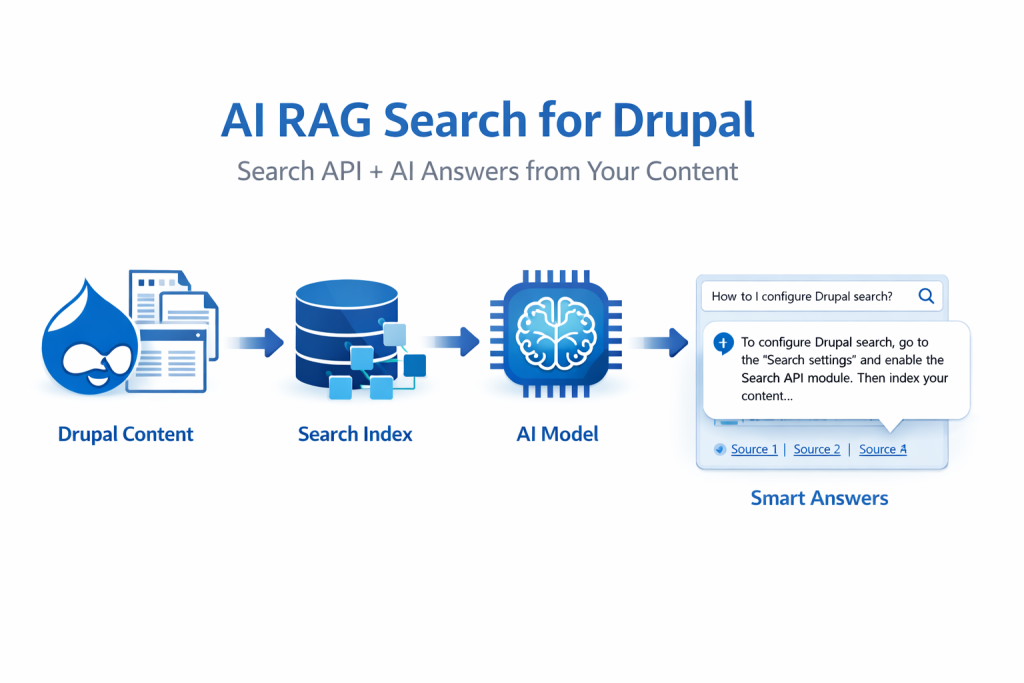
There’s a problem I kept running into on enterprise and government Drupal builds: users searching a content-heavy site and getting back a wall of links. The answer is somewhere in there. Everyone knows it. But nobody’s connecting the dots.
I built RAG AI Search to fix that. The module is live on Drupal.org: drupal.org/project/airagsearch
This post walks through the architecture and the implementation decisions worth talking about — with code from the actual module.
What It Does
RAG AI Search integrates Drupal’s Search API with OpenAI to generate a direct, contextual answer at the top of your search results page — synthesized strictly from your site’s own indexed content — followed by the traditional results underneath.
The key word is grounded. The model is instructed to use only what was retrieved from your index. It doesn’t reach out to the internet. If the answer isn’t in your content, it says so. That was a hard design requirement, especially for the government and institutional contexts this module was built for.
Module Structure
The module follows standard Drupal 10 conventions and keeps a clean separation of concerns across three services:
airagsearch/
├── airagsearch.info.yml
├── airagsearch.routing.yml
├── airagsearch.services.yml
├── airagsearch.install
├── src/
│   ├── Controller/
│   │   ├── AISearchController.php        ← search + summary pages
│   │   ├── AISearchApiController.php     ← REST API endpoints
│   │   └── AnalyticsAdminController.php  ← analytics dashboard
│   ├── Form/
│   │   ├── AISearchForm.php              ← front-end search form
│   │   ├── AISearchSettingsForm.php      ← admin config
│   │   └── TestConnectionForm.php        ← live API key tester
│   ├── Service/
│   │   ├── OpenAIClient.php              ← RAG core logic
│   │   ├── AnalyticsLogger.php           ← query logging + reporting
│   │   └── MarkdownProcessor.php         ← safe AI response rendering
│   └── Plugin/Block/
│       └── AISearchBlock.php             ← embeddable block
└── templates/
    ├── ai-search-results.html.twig
    └── ai-search-analytics.html.twig
Three services do all the real work. Everything else is wiring.
The Services Layer
Services are registered in airagsearch.services.yml using Drupal’s dependency injection container:
services:
  airagsearch.openai_client:
    class: Drupal\airagsearch\Service\OpenAIClient
    arguments:
      - '@http_client'
      - '@config.factory'
      - '@logger.channel.airagsearch'

  airagsearch.analytics_logger:
    class: Drupal\airagsearch\Service\AnalyticsLogger
    arguments:
      - '@database'
      - '@config.factory'
      - '@logger.channel.airagsearch'
      - '@datetime.time'

  airagsearch.markdown_processor:
    class: Drupal\airagsearch\Service\MarkdownProcessor

  logger.channel.airagsearch:
    parent: logger.channel_base
    arguments: ['airagsearch']
Drupal’s container handles instantiation, so each service is injected into the controller via the static create() factory — no service locator calls scattered through the code.
The Core RAG Flow: OpenAIClient
OpenAIClient.php is where the RAG pattern lives. The public-facing method is askChatGPT(), which takes the user’s query and an array of already-retrieved documents:
public function askChatGPT(string $query, array $context) {
  if (empty($this->apiKey)) {
    $this->logger->error('Missing OpenAI API key.');
    return 'No OpenAI API key configured in admin settings.';
  }

  $model       = $this->config->get('chatgpt_model') ?: 'gpt-4o-mini';
  $temperature = $this->config->get('temperature') ?? 0.7;
  $max_tokens  = $this->config->get('max_tokens') ?? 500;

  $query       = $this->normalizeUtf8String($query);
  $context     = $this->normalizeContextArray($context);
  $contextText = $this->buildContextText($context);
  $prompt      = $this->buildPrompt($query, $contextText);

  $response = $this->httpClient->post('https://api.openai.com/v1/chat/completions', [
    'headers' => [
      'Authorization' => 'Bearer ' . $this->apiKey,
      'Content-Type'  => 'application/json',
    ],
    'json' => [
      'model'       => $model,
      'temperature' => (float) $temperature,
      'max_tokens'  => (int) $max_tokens,
      'messages'    => [
        ['role' => 'system', 'content' => 'You are a helpful Drupal site search assistant. Provide concise, accurate answers based solely on the provided context. If the context does not contain enough information to answer the question, say so clearly.'],
        ['role' => 'user',   'content' => $prompt],
      ],
    ],
    'timeout' => 30,
  ]);

  $data = json_decode($response->getBody()->getContents(), TRUE);
  return $data['choices'][0]['message']['content'] ?? 'No response from ChatGPT.';
}
The retrieval step happens upstream in the controller — by the time askChatGPT() is called, the documents are already in hand. This separation means the OpenAI client has no knowledge of Search API, and the controller has no knowledge of how prompts are built.
Prompt Engineering: Keeping the Model Honest
The prompt is doing real work here. buildContextText() formats each retrieved document into a numbered structure, and buildPrompt() wraps it in explicit guardrails:
protected function buildContextText(array $context): string {
  $contextText = '';
  $count = 0;

  foreach ($context as $item) {
    $count++;
    $title   = $this->normalizeUtf8String((string) ($item['title'] ?? 'Untitled'));
    $content = $this->normalizeUtf8String((string) ($item['body'] ?? ($item['snippet'] ?? '')));
    $url     = $this->normalizeUtf8String((string) ($item['url'] ?? ''));

    // Embed URLs as markdown links so the model can cite sources naturally
    $title_markup = !empty($url) ? "[{$title}]({$url})" : $title;

    $contextText .= "Document {$count}:\n";
    $contextText .= "Title: {$title_markup}\n";
    if (!empty($content)) {
      $contextText .= "Content: {$content}\n";
    }
    $contextText .= "\n";
  }

  return $contextText;
}

protected function buildPrompt(string $query, string $contextText): string {
  return <<<EOT
You are answering a user's search query based on content from a Drupal website.

IMPORTANT INSTRUCTIONS:
1. Use ONLY the information provided in the context below
2. Do NOT invent, assume, or add information not present in the context
3. If the context does not contain enough information to answer the question, say so clearly
4. Be concise but thorough
5. Cite which document(s) your answer comes from when relevant

CONTEXT:
{$contextText}

USER QUERY: {$query}

Provide a clear, accurate answer based solely on the context above.
EOT;
}
Embedding source URLs directly into the context as markdown links lets the model reference them naturally in its response — without any post-processing to inject citations.
The Summary Endpoint
Beyond the per-query answer, the module has a dedicated summary endpoint at /airagsearch/summary. This pulls up to 20 results for the current session query and passes them to askChatGPTSummary(), which uses a more structured prompt:
$prompt = <<<EOT
You are summarizing combined content from up to 20 Drupal search results.

TASK:
Create a concise, well-structured summary focused on the user's query below.
Include:
- Key themes and topics
- Notable facts or data points (only if present)
- Important entities (people, places, organizations) explicitly mentioned
- Gaps or limitations if information is sparse

STRICT RULES:
1. Use ONLY the provided context — do not invent.
2. Do NOT include content not present in the documents.
3. Keep wording neutral and factual.
4. Prefer bullet points and short paragraphs.
5. If documents conflict, note the discrepancy.

USER QUERY: {$query}

CONTEXT:
{$contextText}

Provide the summary now.
EOT;
The summary uses a higher max_tokens ceiling (configurable via summary_max_tokens, defaulting to 800 vs 500 for standard answers) and a 40-second timeout. Multi-document synthesis takes more time and produces longer output — those defaults reflect the actual workload.
Safe Markdown Rendering: MarkdownProcessor
OpenAI responses come back as markdown. Rendering that directly as HTML without sanitization is an XSS vector. The MarkdownProcessor service handles this — critically, Html::escape() runs first, before any pattern matching:
public function convertToHtml(string $markdown): string {
  if (empty($markdown)) {
    return '';
  }

  // Escape HTML first to prevent XSS — before any pattern matching
  $text = Html::escape($markdown);

  // Headings
  $text = preg_replace('/^### (.+)$/m', '<h3>$1</h3>', $text);
  $text = preg_replace('/^## (.+)$/m',  '<h2>$1</h2>', $text);

  // Links — validated before rendering
  $text = preg_replace_callback('/\[([^\]]+)\]\(([^\)]+)\)/', function ($matches) {
    $raw_url  = trim($matches[2]);
    $label    = htmlspecialchars($matches[1], ENT_QUOTES, 'UTF-8');
    $safe_url = UrlHelper::stripDangerousProtocols($raw_url);

    if (!UrlHelper::isValid($safe_url, TRUE)) {
      return $label; // Render label only — drop the invalid URL
    }

    $url = htmlspecialchars($safe_url, ENT_QUOTES, 'UTF-8');
    return '<a href="' . $url . '" target="_blank" rel="noopener noreferrer">' . $label . '</a>';
  }, $text);

  $text = preg_replace('/\*\*(.+?)\*\*/', '<strong>$1</strong>', $text);
  $text = preg_replace('/(?<!\*)\*(?!\*)(.+?)(?<!\*)\*(?!\*)/', '<em>$1</em>', $text);

  // Lists, paragraphs...

  return $text;
}
Any HTML the model might emit gets entity-encoded before markdown patterns are applied. URL validation via Drupal’s UrlHelper::stripDangerousProtocols() and UrlHelper::isValid() ensures links in AI responses can’t be weaponized. If a URL fails validation, the label renders as plain text and the link is dropped entirely.
The Analytics Layer
Every search gets logged to a custom airagsearch_analytics table defined in airagsearch.install via hook_schema():
function airagsearch_schema() {
  $schema['airagsearch_analytics'] = [
    'fields' => [
      'id'            => ['type' => 'serial', 'unsigned' => TRUE, 'not null' => TRUE],
      'query'         => ['type' => 'varchar', 'length' => 255, 'not null' => TRUE],
      'count'         => ['type' => 'int', 'unsigned' => TRUE, 'not null' => TRUE, 'default' => 1],
      'last_accessed' => ['type' => 'int', 'unsigned' => TRUE, 'not null' => TRUE],
      'zero_results'  => ['type' => 'int', 'unsigned' => TRUE, 'not null' => TRUE, 'default' => 0],
    ],
    'primary key' => ['id'],
    'unique keys' => ['query_unique' => ['query']],
    'indexes'     => ['last_accessed' => ['last_accessed'], 'count' => ['count']],
  ];

  return $schema;
}
The AnalyticsLogger service uses an upsert pattern — UPDATE first, INSERT only if no row was updated — to keep the table aggregated by unique query rather than storing a row per search event. There’s also a race condition guard for concurrent requests:
public function logSearch(string $query, bool $zero_results = FALSE): void {
  $updated = $this->database->update('airagsearch_analytics')
    ->expression('count', 'count + 1')
    ->fields(['last_accessed' => $this->time->getRequestTime()])
    ->condition('query', $query)
    ->execute();

  if (!$updated) {
    try {
      $this->database->insert('airagsearch_analytics')
        ->fields([
          'query'         => $query,
          'count'         => 1,
          'last_accessed' => $this->time->getRequestTime(),
          'zero_results'  => $zero_results ? 1 : 0,
        ])
        ->execute();
    }
    catch (\Throwable $e) {
      // Race condition: another request inserted between our UPDATE and INSERT.
      // Retry the UPDATE.
      $this->database->update('airagsearch_analytics')
        ->expression('count', 'count + 1')
        ->fields(['last_accessed' => $this->time->getRequestTime()])
        ->condition('query', $query)
        ->execute();
    }
  }
}
The table is also capped at a configurable max_records limit (default 1,000), pruning the oldest-accessed rows automatically. No runaway table growth on high-traffic sites.
The zero results report is the most useful output in practice:
public function getZeroResultQueries(int $limit = 50): array {
  return $this->database->select('airagsearch_analytics', 'a')
    ->fields('a')
    ->condition('zero_results', 0, '>')
    ->orderBy('zero_results', 'DESC')
    ->orderBy('last_accessed', 'DESC')
    ->range(0, $limit)
    ->execute()->fetchAll();
}
If users are repeatedly searching for something your index isn’t returning, that’s a content gap — and now you have the data to act on it. The full analytics dashboard lives at /admin/reports/airagsearch-analytics.
REST API
Beyond the Drupal UI, the module exposes its own REST API — useful for headless setups or cross-platform integrations. Routes are defined in airagsearch.routing.yml:
airagsearch.api_results:
  path: '/api/airagsearch/results'
  defaults:
    _controller: '\Drupal\airagsearch\Controller\AISearchApiController::searchResults'
  methods: [GET]
  requirements:
    _custom_access: '\Drupal\airagsearch\Controller\AISearchApiController::access'

airagsearch.api_summary:
  path: '/api/airagsearch/summary'
  methods: [GET]
  ...

airagsearch.api_status:
  path: '/api/airagsearch/status'
  methods: [GET]
  ...
The API uses custom access control rather than Drupal’s standard permission check — this lets API consumers authenticate via token rather than requiring a Drupal session cookie.
Installation
composer require drupal/airagsearch
drush en airagsearch -y- Go to
/admin/config/search/search-api— confirm an index exists with title and body fields populated. - Go to
/admin/config/search/airagsearch— enter your OpenAI API key, select the index, pick a model. - Use the Test Connection button at
/admin/config/search/airagsearch/testto verify the key before going live. - Your search page is at
/airagsearch. Analytics at/admin/reports/airagsearch-analytics.
Drupal 10+ required. PHP 8.1+. The database Search API backend works fine for most sites — Solr and Elasticsearch are supported for larger deployments.
What’s Next
- Response caching via Drupal’s key-value store (same query + same results = serve cached answer, skip the API call)
- Multi-provider support: Anthropic Claude, Google Gemini
- Tighter Search API Autocomplete integration for query suggestions
If you’re using the module and run into something, open an issue in the queue. Source is on Drupal.org GitLab and contributions are welcome.
No Comments yet!